Privacy-First Android Safety Assistant

Pause. Check.
Then act.

KuboCheck helps you examine links, QR codes, suspicious messages, installed apps, and Android security settings before you click, pay, reply, install, or share.

It shows the warning signs it finds, explains why they matter, and recommends practical next steps.

Before You Tap, KuboCheck.
Preview APK · Debug-signed testing build · Designed for Android 8.0 and later · Tested on an Android 15 emulator
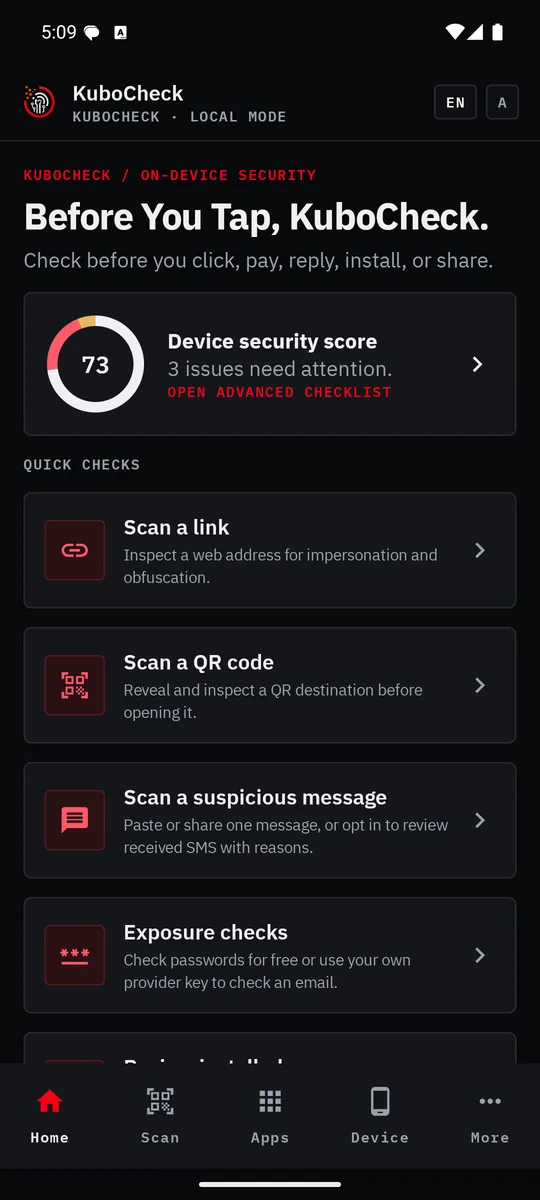
KuboCheck home dashboard showing the tagline, device-security score, and quick checks for links, QR codes, suspicious messages, and breach exposure.
Native Android experience Core analysis runs on-device Submitted web pages are not rendered Encrypted on-device history No advertising or analytics SDK No automatic SMS monitoring

Scams depend on rushed decisions

A convincing message, disguised link, or unfamiliar QR code can create pressure to pay, reply, install, or share information immediately. The warning signs are often small and easy to miss.

KuboCheck creates a safer pause

Choose what you want to inspect. KuboCheck looks for explainable warning signs, presents the evidence behind its assessment, and recommends what to do next.

KuboCheck is decision support — not a guarantee.
Feature overview

What KuboCheck checks

Check before opening

Link analysis

Inspect a web address for suspicious structure, encoding, shortened links, IP-based destinations, obfuscation, insecure connections, and possible brand impersonation without opening the page.

Optional checks can add public domain-registration evidence and limited HTTPS redirect inspection.

QR inspection

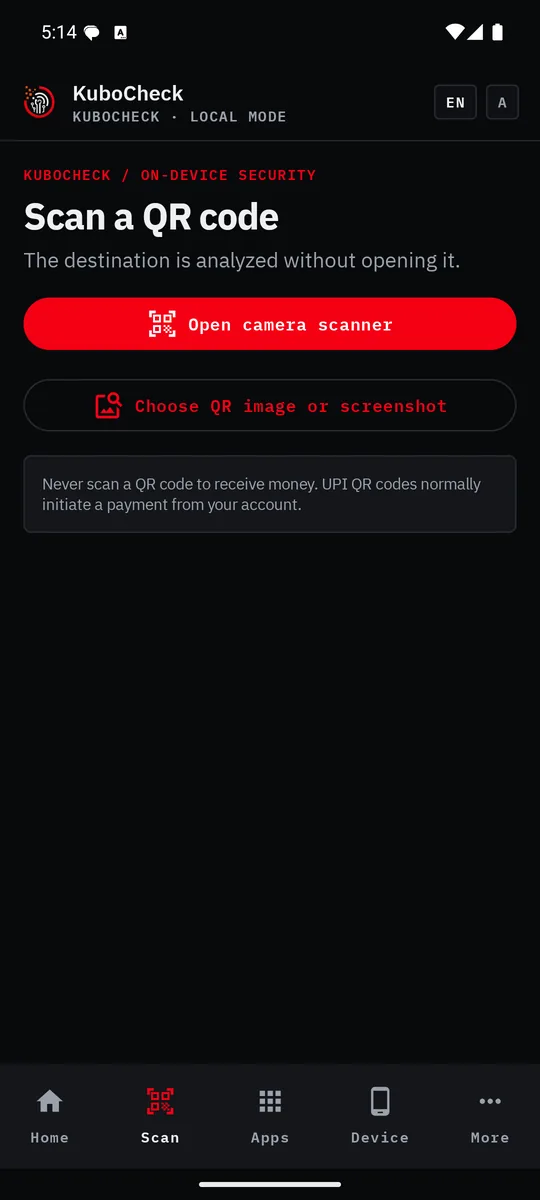
Scan with the camera or choose a screenshot. KuboCheck reveals and assesses the destination before it is opened, including payment-specific guidance for recognized UPI QR codes.

KuboCheck QR safety screen with camera and image-screenshot scanning options plus UPI payment guidance.
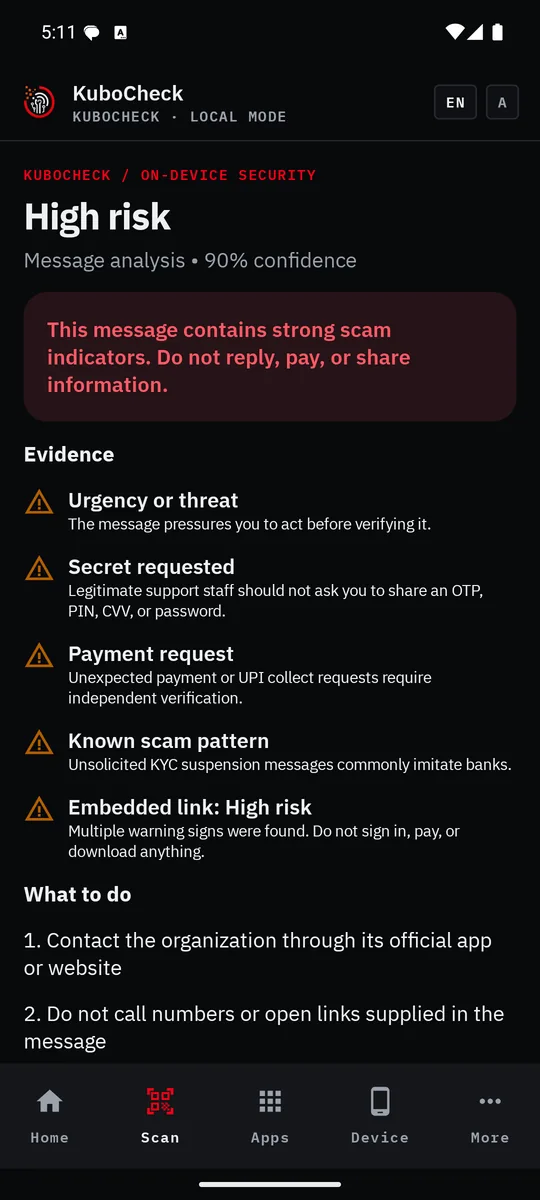
KuboCheck high-risk message result showing urgency, secret request, payment request, scam-pattern, and embedded-link warning signs.

Check before replying or paying

Suspicious-message analysis

Paste or share text from an SMS, email, or messaging app. KuboCheck looks for warning signs involving urgency, OTPs, passwords, payments, APK installation, KYC, digital-arrest threats, jobs, investments, electricity, and courier scams.

Each result includes a risk level, confidence, plain-language evidence, and recommended actions.

On-demand SMS inbox review

With explicit permission, KuboCheck can review received system SMS exposed by Android. Analysis runs locally, results are grouped by verdict, and retained details include clear reasons.

KuboCheck does not monitor SMS in the background and cannot send or reply to messages.

Check your device

Device security score

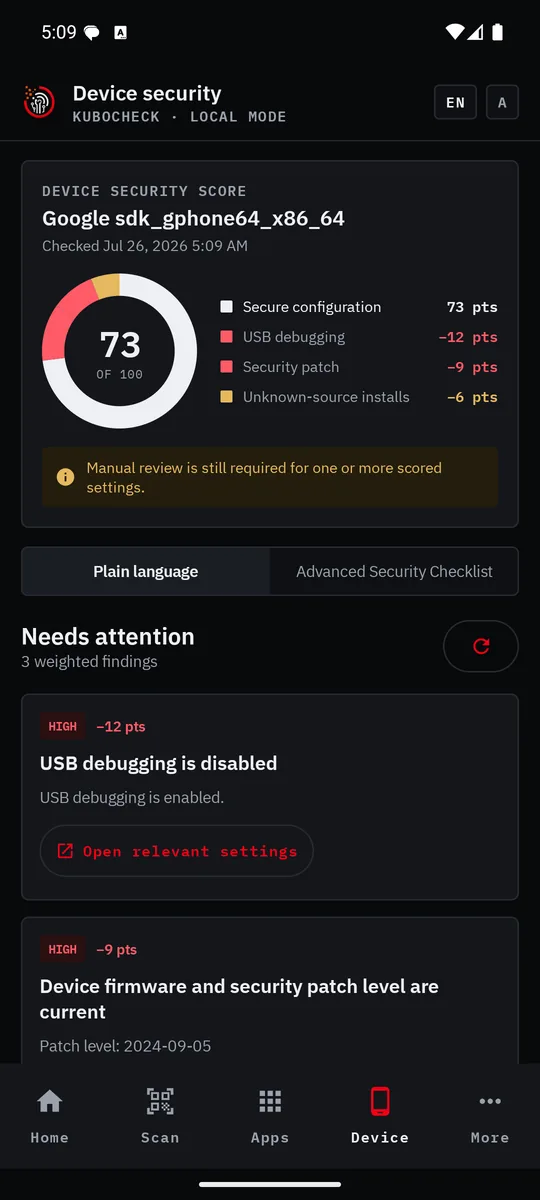
Review signals such as screen lock, security-patch age, encryption, USB debugging, developer options, Private DNS, unknown-source installation settings, and common root indicators through a weighted device-security score.

Installed-app review

Review launchable apps visible to KuboCheck using signals such as currently granted sensitive permissions, enabled special access, installer source, and update age.

The findings explain risk indicators. They do not declare an application to be malware.

KuboCheck device-security dashboard with a 73-point donut score and deductions for emulator security settings.
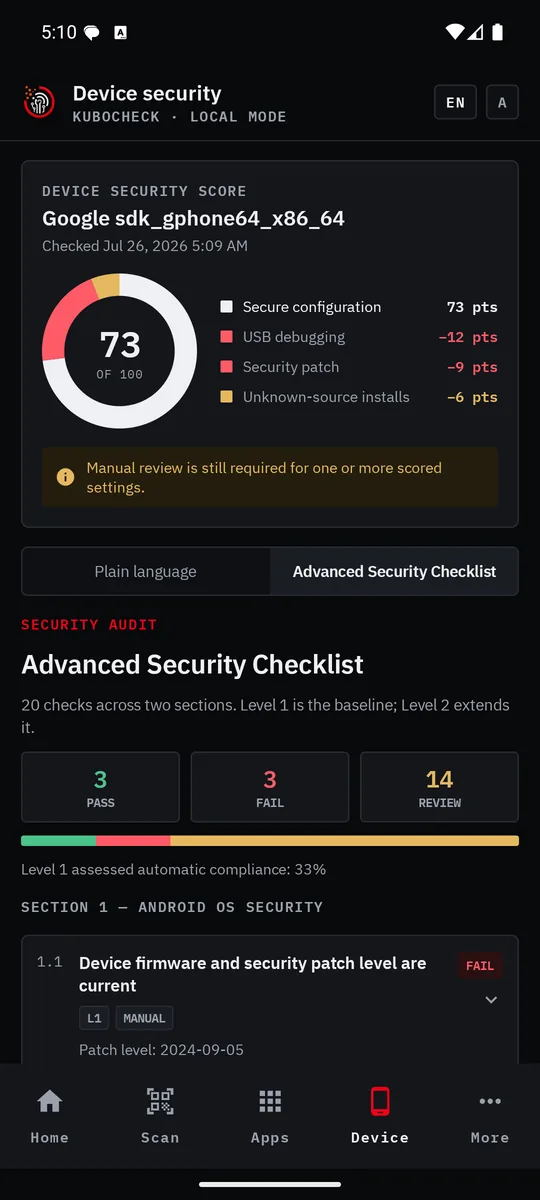
KuboCheck Advanced Security Checklist showing 20 checks with pass, fail, and manual-review summaries.
Understand your device security

Twenty practical checks. One clear view.

The Advanced Security Checklist combines a weighted, severity-aware score with practical Android security and privacy recommendations.

  • 20 checks across two sections
  • Level 1 baseline and Level 2 extended guidance
  • Automatic and guided manual checks
  • Pass, fail, and review summaries
  • Clear explanations and remediation steps
  • Shortcuts to relevant Android settings
  • Persistent manual results
  • Branded PDF device-security reports
Ordinary Android applications cannot verify every protected system setting. KuboCheck clearly marks checks that still require manual review. The score is a practical guide, not a certification.

Check exposure and respond

Password exposure check

Compare a password with the Have I Been Pwned password corpus using a privacy-preserving partial-hash request. The password and complete hash stay on the device.

Authorized email exposure check

Use your own supported provider key to check an email address you own or are authorized to assess. The provider key is encrypted with Android Keystore.

Incident guidance

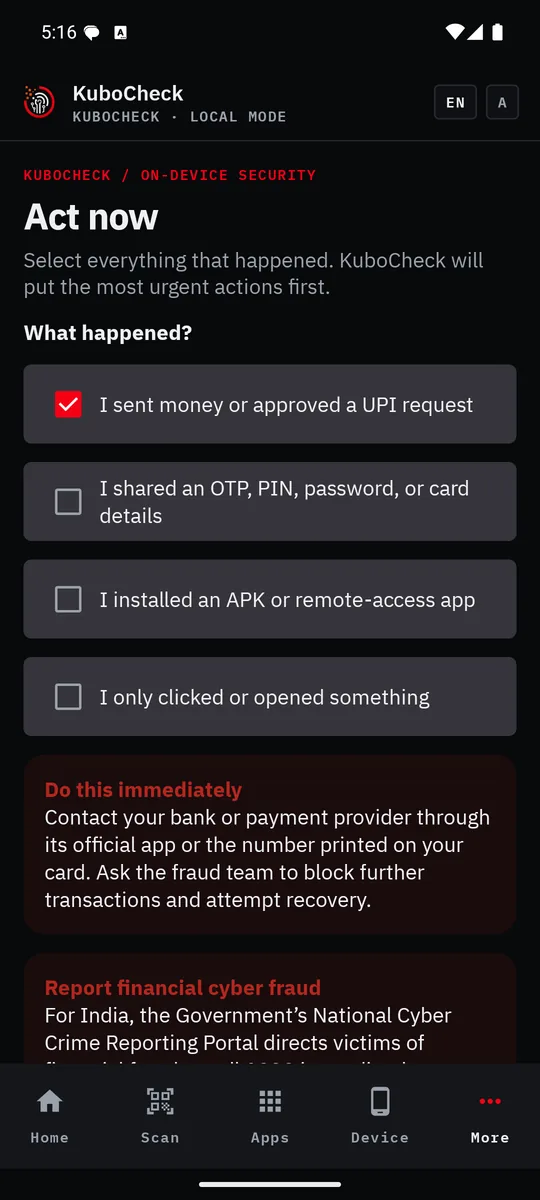
Get prioritized actions for payment loss, exposed credentials, suspicious APK installation, or a link-only event, including access to official India reporting routes.

History, reports, and updates

Keep encrypted scan history under a configurable retention policy, delete individual results, create PDF reports, and manually check GitHub for a newer full release.

KuboCheck incident-response screen with a synthetic payment scenario selected and urgent next-step guidance.
How it works

Four steps. You stay in control.

01

Choose a check

Select a link, QR code, message, application, device setting, or exposure tool.

02

Stay in control

Provide only the input, permission, or optional network access needed for that check.

03

Review the evidence

See the assessment, confidence, warning signs, and plain-language reasons.

04

Take the next step

Follow prioritized guidance, save or share a report, or delete the result.

Local-first by design

You stay in control of every check.

Core analysis stays on the device

Link structure, QR payloads, message text, supported SMS, installed-app signals, and device posture are analyzed locally. KuboCheck does not render submitted web pages.

Saved history is protected locally

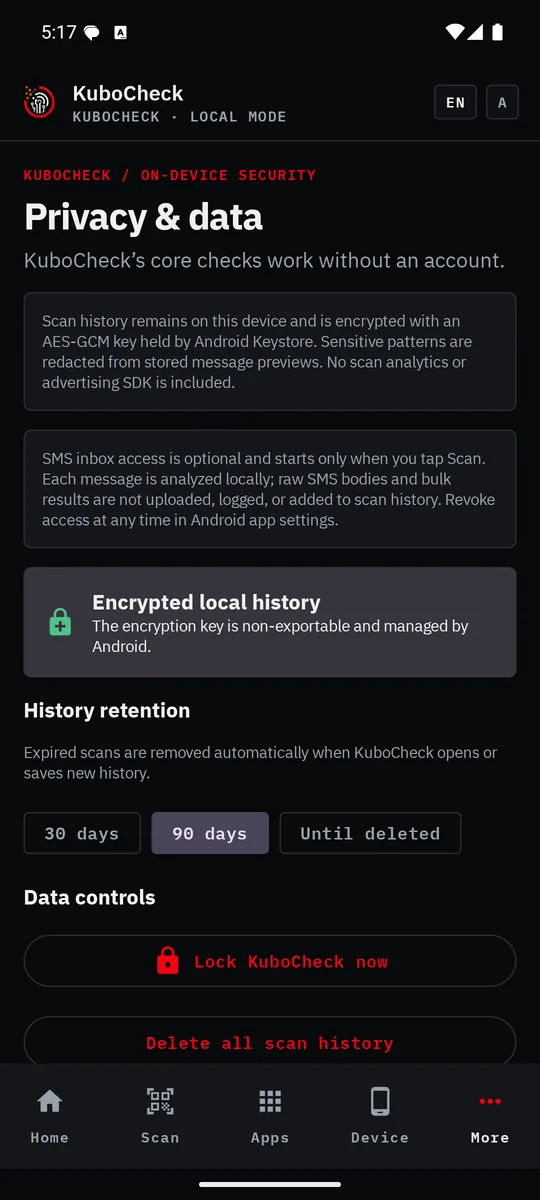
Manual scan history uses AES-GCM encryption backed by Android Keystore. Retention can be set to 30 days, 90 days, or until deletion. Individual results and all local history can be deleted in the app.

The local passphrase protects this installation; it is not a cloud account. There is no recovery server, so resetting a forgotten passphrase deletes encrypted history and cached reports.

Network access is explicit — optional checks run only when requested
  • Domain registration sends only the domain name to a public RDAP service.
  • HTTPS inspection contacts the submitted destination using bounded HEAD requests. The destination can observe the user's IP address.
  • Password exposure sends only a five-character hash prefix to Have I Been Pwned.
  • Email exposure sends the full address to Have I Been Pwned only after consent and requires the user's provider key.
  • Update checking contacts GitHub only after the user taps "Check for updates".
  • KuboCheck does not silently download or install updates.
  • KuboCheck privacy screen describing encrypted local history, on-demand SMS access, retention choices, and data controls.
    On-demand SMS review — limitations
    KuboCheck does not monitor messages in the background. Inbox review begins only after you open the feature, read the disclosure, grant permission, and start a scan. Raw SMS bodies are processed locally and discarded after classification; bulk results are not uploaded or logged. Android exposes only compatible received system SMS — KuboCheck cannot access RCS-only conversations, MMS bodies, WhatsApp, Signal, Telegram or another app's private database, email, or messages in another Android user or work profile. Manual paste and Android sharing remain available without inbox permission.
    Compatibility

    Designed for Android 8.0 and later

    Minimum: Android 8.0 Oreo (API 26) Target: Android 14 (API 34) Emulator tested: Android 15 (API 35) Camera & telephony optional

    Feature availability can vary by Android release, device manufacturer, work-profile policy, granted permissions, and installer restrictions. Future Android versions may require KuboCheck updates as platform security and privacy rules change. Compatibility with every future Android version is not guaranteed without testing.

    Android testing preview

    Try the latest KuboCheck debug preview.

    Explore the current Android testing build and review its release notes, checksum, and signing information on GitHub.

    Testing preview — not a production release. Download only from the official KubotorTech release page. Android may ask you to approve installation from your browser or file manager.
    FAQ

    Common questions

    Is KuboCheck an antivirus?

    No. KuboCheck provides explainable safety assessments for supported inputs and device signals. It does not continuously monitor the device or prove that an app, sender, or destination is safe.

    Does KuboCheck open a link while analyzing it?

    The default structural analysis is local and does not open the website. If you explicitly enable HTTPS and redirect inspection, KuboCheck sends limited HEAD requests but does not render or save page content.

    Does it scan my messages automatically?

    No. You can paste or share an individual message without inbox access. Received system SMS review is a separate, user-started feature that requires explicit permission.

    Can it read WhatsApp, Signal, or Telegram?

    No. KuboCheck cannot access another app's private message database. Text from those services can be pasted or shared manually for analysis.

    Where is scan history stored?

    Manual scan history is encrypted on the device with an Android Keystore-backed key. You can configure retention, delete individual entries, or erase all local history.

    Does KuboCheck require an online account?

    No. Its account and passphrase are local to the installation. There is no cloud identity or recovery server.

    Does every feature work offline?

    Core analysis is local. Optional domain, HTTPS, password exposure, email exposure, and update checks require a network connection and disclose what they contact.

    Will it work on future Android versions?

    KuboCheck is designed for Android 8.0 and later today. Future platform changes may require an application update, particularly for restricted permissions such as SMS access.

    Can KuboCheck guarantee that something is safe?

    No. A low-risk result means the supported checks did not find strong warning signs. It is not proof of safety.

    KuboCheck provides informational safety guidance based on the evidence available to the application. Results can be incomplete, legitimate content can resemble scams, and harmful content can avoid known patterns. Do not rely on a verdict as the only basis for a financial, security, or legal decision. When uncertain, contact the organization through its official application, website, or independently verified phone number.